
Before starting this project I had only experience in html and jquery. So I can’t remember all the decisions but I’ll try to explain the things I remember.
*Why use javascript and not use any other languages to write software? - At the time I really wanted to learn web development so js was an easy choice it was also the most flexible and the easiest to deploy and maintain (new version, update server and done, software is local so update on everyone's pc seemed a lot of work and at the time I had no idea how I could create an automatic update system)
*Why use Vue.js? -With me having no experience and having to convince my boss I could create something in a short time period I quickly tested out the 3 biggest frameworks (at the time Vue was an upcoming one, but had a lot of promise if I believed my friend). The result of the test was that Vue felt the easiest and cleanest to use. (And I don’t regret that choice!)
*Why Nuxt.js? - I still had no experience in developing anything and because there was a bit of pressure in the time window I had to prove myself I could do this. And found a boilerplate with nuxt and express back-end in one project.
These were the 3 starting choices I had to make now I’ll try to pick stuff that was interesting to me breaking up the project in tiny parts. The deployment of the project The first deployment we used was via an linux server and using docker containers to deploy the project via nginx but because we wanted to use the filesystem of the company this was not possible via linux so we had to use an ftp server to upload files to the correct folder. But after a while we changed to a windows server so we didn’t need the fpt server anymore and to deploy it we used the nodeiis module to run it via iis And now via git I can just push it and build it on the server with a few clicks.
The next big thing was the use of Electron.js A problem I could not fix was the ability to open files from the server because of browser security; this was not possible but then I discovered Electron.js. This way it was possible to open files with the correct server path. But one problem again was the maintenance of an app. At the time I just rendered the website in an electron environment and only used it to open files so there were no updates to be done. Later on I added more and more stuff like tabs so you can open multiple instances of the site in the app and in the latest update I made it so the app can be automatically updated by the user so no more manual installs, yay TL;DR The update system uses the electron-update package and looks at a static server where you can put the installer and a yml script created when you build the app For the static server I just use an IIS service on a windows server and allow it to see the files in the folder, now I just build it on the server and copy the files to the static folder and when they restart the app they will be asked to install the update.
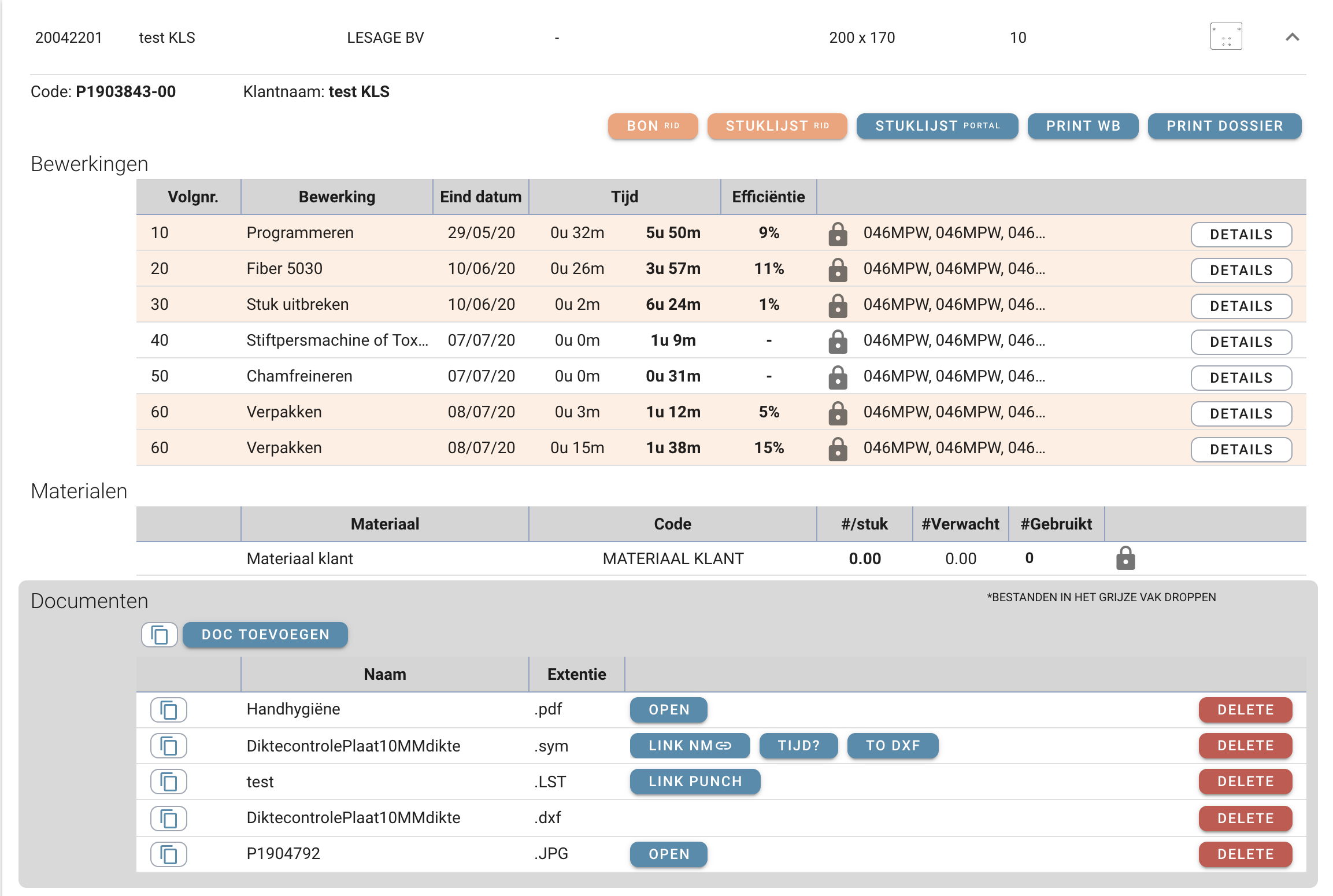
An order: In this picture you see an example of an order, this is probably the most used feature. It contains everything you need to see as an employee. The view shows information you need at least a few clicks if you want the same in the ERP software in addition the format and thumbnail of the part comes from a custom database that is used to create a ‘nesting’ to laser the parts (mode explanation will come later about this). It also allows you to open/add/delete files connected to the part, close operations (if an employee forgot to badge) and open the order or part in the ERP software (orange buttons)